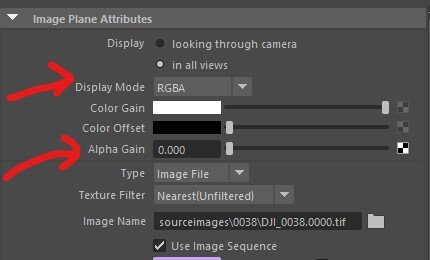
So, one problem that I faced last week while I was working on a live-action shot is how to hide the image plane/backplate in alpha but still make it visible in the reflection. I generally work more with Redshift rather than Arnold, so it seems a little weird not being able to make the backplate's alpha 0 in the render.

The backplate is visible in beauty, which is good. But when I check the alpha, it's white where the backplate is. Btw, I am using a plane with matte shadow material to capture cast shadow.

This seems to be a problem. Now turning off the primary visibility of the image-plane doesn't work somehow with Arnold. There is one workaround that is basically writing
background_visibility 0
in Arnold render settings diagnostic tab.


It solves the alpha, but the whole visibility in color, reflection, refraction is gone.
So, the proper way to do this is in the Image-plane Display mode or the Alpha gain of the Image-plane. Either, you can go for RGB display mode, which will still show the alpha of the HDR as white, or you can make the image-plane alpha gain 0, which will make the alpha 0 where the image-plane is. So, this, eventually solved my problem.